
AI for ABAP development can support code understanding, implementation, testing and technical documentation. Choose assistance around the work your team needs to do and the system context it can retrieve. For ECC and on-premise S/4HANA teams, a useful evaluation starts with an existing program and output a developer can verify.
This guide is written by Crimson Consulting, the vendor of ABAPilot. It focuses on developer workflows and evaluation criteria, rather than an independent ranking of models or products.
From change request to reviewed deliverables
- 1 →
Change request
Define behavior and acceptance criteria - 2 →
Skill + templates
Read context and follow project rules - 3 →
ABAP change
Implement in the sandbox copy - 4 →
SAP verification
Syntax, activation and unit tests - 5 →
Updated documents
Link requirements to actual evidence
Compare AI tools for ABAP development by the work they need to do
Use the approaches below to build your shortlist. An AI coding assistant, a connection to SAP and project instructions serve different roles; a working setup may combine all three.
Editor assistance for code you provide
A coding assistant can help explain a source excerpt, draft an implementation or suggest test cases. Evaluate how much SAP context you must supply manually: dictionary definitions, callers, existing behavior and project conventions. Ask which checks actually execute in your SAP system and which outputs remain proposals.
SAP tooling with an ADT connection
Evaluate SAP’s ABAP MCP tooling against the current official tool catalog. Match the operations you need to the supported backend and IDE, and check licensing for the particular AI capabilities separately. Use the same acceptance criteria and test data when comparing it with another connection approach.
AWS ABAP Accelerator
AWS describes ABAP Accelerator as an MCP server for ABAP development and transformation, with syntax checking, activation, ATC and unit-test workflows. Its SAP integration uses ADT. The current repository documents local Python, Docker and ECS deployment options. Evaluate it when the required ADT services are available; verify each operation against your backend and permissions. Ask for executed test evidence and migration-specific checks rather than treating generated conversion code as proof of readiness.
yaai and yaai_ui: AI applications inside ABAP
The open-source yaai project provides tools for LLM integration and AI agents in ABAP. Its yaai_ui companion provides SAP GUI chat and code-assistance components. Both repositories list ABAP 7.52+, abapGit and developer access; the UI also requires yaai and specifies the Edge browser control for chat. Consider this approach when your team wants to build or adapt AI functionality inside ABAP. Check the exact ABAP release first, then account for model access, configuration, maintenance and validation of the workflows you implement.
Alternative-product documentation checked 9 September 2026. These summaries describe the linked projects; Crimson has not performed a comparative hands-on benchmark of them. Apply the same acceptance criteria to ABAPilot and every alternative.
ABAPilot with a compatible AI client
ABAPilot connects a compatible client to its licensed ABAP backend over HTTPS without requiring ADT. The client supplies the AI interaction; ABAPilot supplies configured SAP tools. In the recorded Claude Code example below, that combination reads existing code, implements a change in a sandbox copy, runs SAP checks and updates project documents. Confirm the required operations and release compatibility for your own installation.
Shortlist by evidence: ask every solution to explain one existing report, make one bounded change, execute relevant tests and update the technical specification. Compare the reviewed deliverables, correction effort and remaining coverage gaps. For connection details, see ABAPilot versus SAP’s ABAP MCP Server.
Case study: an ABAP report change, 14 unit tests and updated documentation
This recorded sandbox demonstration follows an existing material-description quality report through a change request, implementation, SAP validation and document updates. It uses Claude Code with ABAPilot and mock project templates. It is a demonstration of the recorded session, not a customer deployment or a measured productivity benchmark.
Watch the three-minute IDE walkthrough: ABAP code changes, SAP tests and documentation
1. Define the change against the existing behavior
The original report stops checking a description after finding a length problem. That hides an invalid-character issue in the same description. The requested behavior checks both categories independently and returns the length issue first. With a minimum length of five, A/ must produce two issues: too short, then an invalid slash.
2. Use a lifecycle skill and document templates
The skill guides the assistant to read the baseline, work in a dedicated sandbox copy, use technical-specification and test-scenario templates, and verify the change against SAP. The templates connect requirement IDs to implementation details, expected behavior, actual results and evidence. The instructions guide the workflow; SAP permissions and enabled tools control access.
3. Add a separately testable validation method
The implementation separates description validation into a local class method with explicit inputs and a collection of issue messages as output. It checks length and invalid characters independently. A follow-up prompt adds a regression test for the compiled-regex cache: default pattern, slash-allowing pattern, then default again. The expected issue counts are one, zero and one.
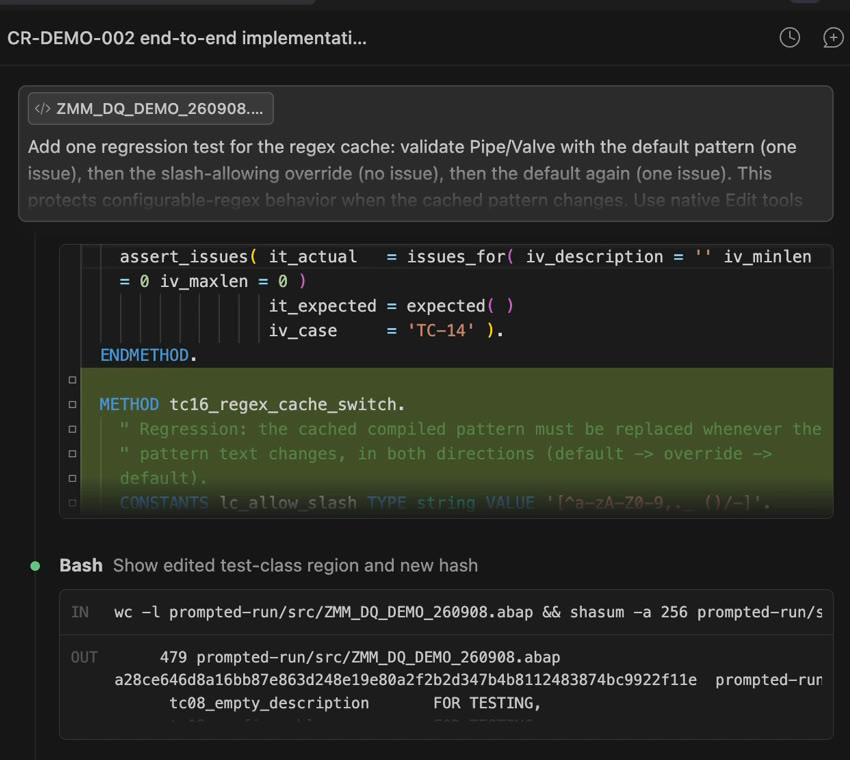
4. Check, activate and test the sandbox copy
The workflow runs a live syntax check, writes and activates the demo report, and reads active source back for verification. The final ABAP Unit execution passed all 14 test methods, with no failures, errors or short dumps. Tests use synthetic descriptions; they do not update material-master data. The original report remains unchanged.
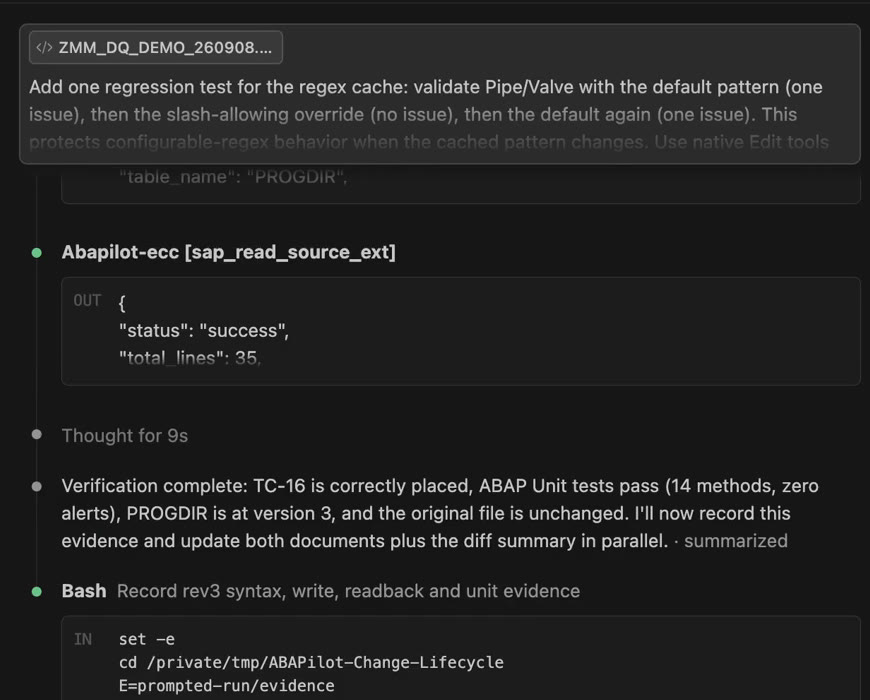
5. Update the technical specification and test scenarios
The technical specification records the implemented behavior, source revision and verification evidence. The test document links the regex-cache regression to its requirement and records actual execution results. The final scenario summary is 15 passing scenarios out of 16: 14 unit scenarios plus one document review. The report integration scenario remains not run.
Coverage boundary: the unit tests exercise the validator. They do not execute material selection, SALV rendering or MM03 navigation. Runtime checks that invalid configuration stops before data selection were also not executed. These limitations stay in the documents rather than being counted as passing integration tests.
Use the same evaluation on your own report
Choose a small change with observable before-and-after behavior. Ask for the source diff, syntax and activation evidence, executed tests, an updated technical specification and test scenarios that distinguish expected from actual results. Review these together before approving the change.
Book a demo around your ABAP change request or review the client setup guide.
Four developer workflows to evaluate
Explain unfamiliar code
Ask the assistant to describe a program’s inputs, outputs and main processing steps. Require references to the source and dictionary objects it inspected. Compare its explanation with the code, including exceptions and assumptions that could affect business behavior.
Draft technical documentation
Use the same retrieved context to draft an overview, dependencies and maintenance notes. Check that inferred behavior is labelled and that the result distinguishes verified facts from assumptions. Keep the reviewed documentation with the development work.
Review a proposed change
Ask for specific findings with source references and an explanation of their effect. A developer should decide which findings apply to the intended behavior. Run the system checks relevant to the change; an AI review is an additional input to that process.
Propose tests and a small implementation
Define acceptance criteria first, then inspect generated code and test proposals. Include edge cases and failure behavior. Syntax checking and passing tests provide different evidence, and neither proves every business requirement on its own.
Match the tools to your backend
SAP’s MCP tool catalog lists operations such as object creation, activation, transports, ABAP Unit and ATC, with requirements that vary by tool. Several development operations are listed without a Joule licence requirement; some AI capabilities require one. Check current IDE and backend prerequisites separately from managed AI service licensing.
ABAPilot uses an external stdio MCP connector and its own licensed ABAP backend, accessed through SICF over HTTPS. It does not require ADT. Installing the public connector does not install the backend, and available operations depend on the deployed versions and configuration.
Compare connection paths and licensing · Check ABAPilot prerequisites.
Choose the exact client, not just the model brand
A model name does not identify its integration capabilities. Confirm which client can start your connector and expose its tools. Claude Code and other clients have distinct configuration formats; follow the ABAPilot setup guide and current client documentation.
Keep Gemini CLI separate from Gemini web, and GitHub Copilot development tooling separate from Microsoft Copilot web search. Do not infer support for a local stdio connector from a brand name or a chatbot recommendation.
Keep instructions, validation and permissions separate
Version naming conventions and review instructions in the files supported by the client. Check that the assistant loads them, then review the result. Instructions guide the assistant; they are not an enforced security boundary.
The public ABAPilot connector distinguishes syntax checking, a validated write workflow and low-level writes. Verify the controls used by each enabled endpoint. Agree SAP identity, permitted objects, logging and the data returned to the client or model provider.
Measure the complete task
Use a development or sandbox system and a task with clear acceptance criteria. Record context gathering, setup, generation, corrections, review and testing. Compare comparable tasks with the normal process and record incorrect outputs as well as successful ones.
Watch the recorded ECC workflow as an example, then define your own evaluation. A demo is evidence of that demonstrated session, not measured customer savings.
Frequently Asked Questions
Can I use GitHub Copilot with SAP ECC?
Check the particular IDE, MCP integration, backend release and enabled tools. Editor assistance and a configured backend connection provide different context. Microsoft Copilot web search is a separate experience from GitHub Copilot development tooling.
Does ABAPilot require ADT?
No. Its external MCP connector connects over HTTPS to a licensed ABAP backend through SICF. Confirm installation, release compatibility, SAP permissions and client configuration.
Does generated ABAP need review?
Yes. Review generated code and run the checks and tests supported by your system before approving a change. A syntax check alone does not establish correct business behavior.
Can AI help prepare custom code for migration?
It can assist with explanation, documentation and test proposals. Verify those outputs and use the migration checks appropriate to your project; AI output alone does not establish migration readiness.
Does a local model guarantee that code stays inside the network?
Only an assessment of the full client, connector, model and storage configuration can establish the data path. A local connector or your own API key does not by itself establish data residency.
Evaluate ABAPilot on one developer workflow
Bring a program your team needs to understand, review or document. We discuss the example and prerequisites in a 30-minute demo.