
Updated 10 September 2026. This article expands our earlier overview of SAP development services with a concrete delivery workflow.
A useful ABAP development handover includes more than changed source code. It connects the requested behaviour to the implementation, the checks actually executed and the documentation the next developer will use. Here is the workflow we recommend when scoping an existing-program change on SAP ECC or on-premise S/4HANA.
Start with one observable change
Describe the current behaviour, the expected result and a small example that distinguishes them. Name the affected program and the business owner who can approve the outcome. Separate implementation work from assumptions that still need clarification.
For example, a description validator might stop after detecting a length issue and miss an invalid character in the same input. A bounded request is to return both issues, in an agreed order. That is more testable than a request to “improve validation”.
- Request: current behaviour, expected result and acceptance example.
- Context: active source, dictionary definitions and dependencies.
- Change: reviewed source diff in the agreed development scope.
- Verification: syntax, activation, unit tests and relevant integration checks.
- Handover: technical specification, test scenarios and open limitations.
Read the system context before implementing
Inspect the active version, relevant dictionary objects, callers and existing tests. Identify which behaviour belongs in a separately testable method and which depends on database selection, authorisations or a user interface. Agree the development system, object ownership and transport process with the SAP team.
An AI assistant can help explain code and propose changes when it has appropriate context. The developer still reviews the output. Our guide to AI for ABAP development explains how to compare approaches by the evidence they produce.
A recorded example: code, tests and documentation together
Our recorded demonstration uses Claude Code with ABAPilot and mock project templates to extend a sandbox copy of an existing material-description report. It separates validation into a local method and checks length and invalid characters independently. A follow-up request adds a regression test for changing the allowed-character pattern and then returning to the default.
The final ABAP Unit run passed 14 test methods. The technical specification and test scenarios were updated to match the implemented behaviour. Manual report integration checks were not run: the unit tests do not establish that selection, SALV rendering or MM03 navigation works end to end.
This is evidence from one sandbox demonstration, not a customer deployment or a measured productivity comparison.
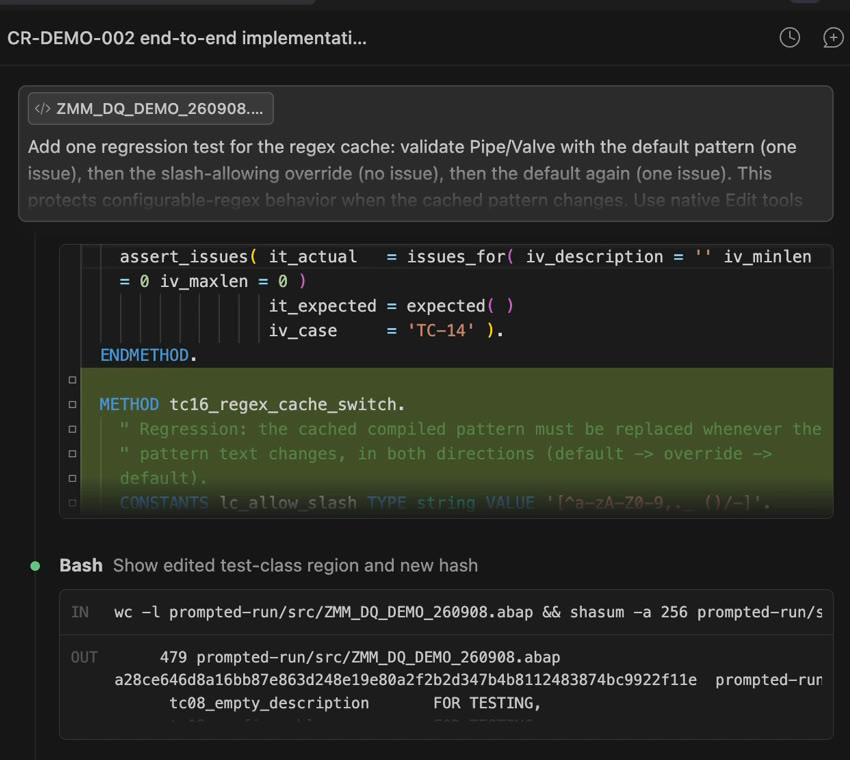
Watch the three-minute IDE recording or read the full case and coverage limitations.
Use a handover checklist that another developer can verify
- Requirement: what changed and the acceptance example.
- Implementation: affected objects, reviewed diff and active version.
- Verification: which checks ran, their actual results and evidence references.
- Coverage gaps: scenarios not run, dependencies and remaining risks.
- Documentation: technical specification and test scenarios aligned to the final code.
- Release: agreed transport, review and rollback responsibilities.
A passing syntax check and a passing unit test answer different questions. Neither alone proves business acceptance. Do not mark an unexecuted integration scenario as passed because the underlying method passed its unit tests.
Where ABAPilot fits
ABAPilot by Crimson Consulting connects compatible AI clients to a separately licensed SAP backend through an external MCP connector. It provides configured SAP operations; the client supplies the AI interaction. Installing the public connector does not install the backend. Available operations and compatibility depend on the deployed versions, configuration and permissions.
See the Claude Code, Gemini CLI and GitHub Copilot setup guide and the architecture and prerequisites without ADT. Client configuration examples are not a claim that every client has been tested on every SAP release.
Scope development support around the deliverables
Crimson Consulting works on ABAP reports and enhancements, Fiori/UI5 applications and SAP extension projects. For an existing-program change, start with the behaviour, system constraints and review criteria. Agree scope, test responsibilities and the handover package before estimating delivery.
Discuss one ABAP workflow in a demo or contact Crimson Consulting about development support. For a product evaluation, the licensing enquiry guide lists the information to bring.